
Math Topics
Learning Support
Professional



Technology Integration is a four part series on essential questions, technology integration resources, web page design, and multimedia in projects. Sections contain relevant opening essays and resources.
Part 1: Essential Questions
 Essential
Questions (Page 1):
Essential
Questions (Page 1):Part 2: Technology Integration Resources
Part 3: Web Page Design
Part 4: Multimedia in Projects
 How
is educational technology defined?
How
is educational technology defined?Historically, there have been numerous definitions and statements concerning the nature and function of educational technology, according to Saettler (2004). Educational technology has been a term including both instructional technologies, which focus on the teacher and the pedagogies they might employ, and learning technologies, which focus on the learner. Its meaning has been "intertwined with certain historical conceptions and practices or bound to specific philosophical and psychological theory as well as with particular scientific orientations" and clouded by "the tendency in some quarters to equate new information technology with a technology of instruction" (Saettler, 2004, p. 5). In the 20th century, four paradigm shifts, each with different philosophical and theoretical orientations, affected theory and practice and definitions of educational technology. Saettler characterized those as "(1) the physical science or media view; (2) the communications and systems concept; (3) the behavioral science-based view . . .; and (4) the cognitive science perspective" (p. 7).
Definitions, and resulting mindset of the educational technologist, have been influenced by the nature of technology of the time and what could be done with it. In the early and mid-20th century, the focus was on using tools associated with instructional technologies from blackboards to overhead projectors, B. F. Skinner's learning machines, films and movies, and mainframe computers. However, the advent of computer terminals, personal computers, the Internet, and the growth of broadband communications in the late 20th century enabled mindset shifts toward learning technologies, as those advances enabled greater interactivity and increased possibilities for collaboration among learners.
 Thus in the 21st century, we see definitions reflecting a new mindset leaning toward learning
technologies and on how instructional technologies can best serve learning. For example,
the Association for Educational Communications and Technology (AECT) defined
educational technology as "the study and ethical practice of facilitating
learning and improving performance by creating, using and managing appropriate
technological processes and resources” (Richey, Silber, & Ely, 2008, p. 24).
AECT has also addressed this issue fully in its book
Educational Technology: A Definition with Commentary, edited by Alan Januszewski and
Michael Molenda (2008).
Thus in the 21st century, we see definitions reflecting a new mindset leaning toward learning
technologies and on how instructional technologies can best serve learning. For example,
the Association for Educational Communications and Technology (AECT) defined
educational technology as "the study and ethical practice of facilitating
learning and improving performance by creating, using and managing appropriate
technological processes and resources” (Richey, Silber, & Ely, 2008, p. 24).
AECT has also addressed this issue fully in its book
Educational Technology: A Definition with Commentary, edited by Alan Januszewski and
Michael Molenda (2008).
In its final report on the EdTech Genome Project the EdTech Evidence Exchange (2021) noted that "education technology (edtech) is broadly defined" and "includes: content-less tools, content-only tools, and content + platform tools; free tools and paid tools; and software tools and hardware tools" (p. 119).
Read more on educational technology in Wikipedia.
 Check out
The Tech&Learning 100@30, a project for 2010
related to Tech&Learning's 30th anniversary. The first honorees were plucked from the past— the founding fathers and
mothers whose inventions, declarations, and theories set the table
for where we are today. This doesn’t mean they can’t be influential
now or in the future. The goal was to recognize achievements from 1980 to the present, and even
to recognize potential ground-breaking leaders of the future. The list contains familiar names as Bandura,
Jobs, Gardner, Bloom, Gates, McLuhan, Gagne, Papert, Thornburg,
Skinner, Negroponte, Stoll, and others.
Check out
The Tech&Learning 100@30, a project for 2010
related to Tech&Learning's 30th anniversary. The first honorees were plucked from the past— the founding fathers and
mothers whose inventions, declarations, and theories set the table
for where we are today. This doesn’t mean they can’t be influential
now or in the future. The goal was to recognize achievements from 1980 to the present, and even
to recognize potential ground-breaking leaders of the future. The list contains familiar names as Bandura,
Jobs, Gardner, Bloom, Gates, McLuhan, Gagne, Papert, Thornburg,
Skinner, Negroponte, Stoll, and others.
Those of us with a long career in education might remember the days of using a typewriter, dial phones, overhead projectors, and copy machines. You might have eventually bought a computer with 64K memory! Oh have times changed. Ray Bendici (2025) identified several top influencers of the past 45 years:
How is technology affecting the learning process?Technology is affecting the learning process in at least seven ways, each of which is elaborated upon in what follows:
Technology is changing the nature of learning. As noted in the National Education Technology Plan 2010 (U.S. Department of Education, 2010), there are "three connected types of human learning—factual knowledge, procedural knowledge, and motivational engagement ... supported by three different brain systems. ... Social sciences reveal that human expertise integrates all three types of learning. Technology has increased our ability to both study and enhance all three types of learning" (p. 15).
In general, contemporary digital learning environments with their multimedia components provide important learning opportunities: interactivity; adaptivity to a user's behavior, knowledge, and characteristics; feedback on performance, choices so that learners can regulate their own learning, nonlinear access, linked representations, open-ended learner input, and communications with other people (National Academies of Sciences, Engineering, and Medicine, 2018, pp. 165-166). There is a caveat to web-based learning, however, which may be debatable. In his Framework for Thinking About Tech Integration, Paul Emerich France (2020) cited John Hattie's research on Visible Learning noting "Web-based adaptive products make students passive receptacles of knowledge as opposed to active co-constructors of knowledge, which limits opportunities for engagement.
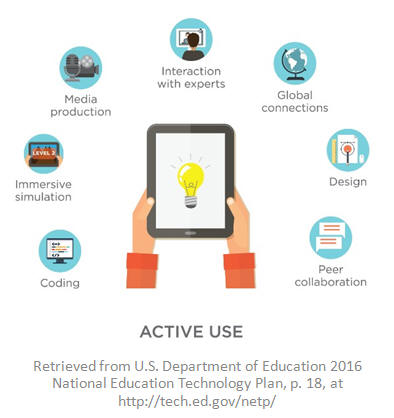
One does not have to look far to see the affect and influence of the rise of broadband Internet connectivity, the increase in social networking, and greater use of mobile devices on learning. These have enabled those who possess technology to quickly capture knowledge and information, easily communicate, get feedback from, and collaborate with peers. Technology becomes another vehicle for creativity, self-expression, and self-production and publication. It allows for constant engagement.
However, in promoting active use of technology such as seen in the figure found in the National Education Technology Plan 2017 update (p. 21), the U.S. Department of Education (2017) noted that schools have a role to play not just in making technology available to close a digital divide, but to close a digital use divide by "ensuring all students understand how to use technology as a tool to engage in creative, productive, life-long learning rather than consuming passive content. Simply consuming media or completing digitized worksheets falls short" (p. 21).
Raj Vali (2015) pointed out changes in how students learn brought about by mobile technologies:
"Tablets change how we perceive computing." Consider apps with animation, interactivity, and the entertainment factor.
"Education is gamified." Consider the impact on motivation when educators introduce elements of games into curriculum.
Learners expect "real-time feedback."
However, the rise of digital communication platforms (e.g., use of social media hubs) does come with a potential danger in that "communication becomes truncated." Vali stated that "some students are losing the ability to articulate ideas in longer form. Additionally, they have fewer opportunities to engage in face-to-face communication. For that reason, it's important for educators to make sure students have the opportunity to participate in collaborative activities and face-to-face meetings" (section 4).
"Hands-on learning" via mobile technologies. "Technologies such as the augmented reality Google Glass, digital and interactive paper, and animated learning through apps are changing the way education is becoming personalized. Today, forward-thinking learning centers avoid video lectures in favor of two-way interactions in which tutors walk students through problem solving and demonstrate new concept using tablets" (section 5).
Unlike using a paper-based book with a finite number of pages, technology makes the user aware that acquisition of knowledge is potentially limitless. Knowledge is constantly evolving with the end result that complete mastery of any topic is not truly possible. Not all information is complete, there are multiple points of view and opinions on a topic that can easily be accessed. Not all of those perspectives are from authoritative, peer-reviewed sources. The ease of anyone publishing anything leads to a need for constant questioning of what one reads. The result is that schools must take a greater role in helping learners to critically evaluate online content.
Technology is empowering students in four key ways, according to Lemke and Coughlin (2009): democratization of knowledge, participatory learning, authentic learning and multimodal learning. Democratization is brought about because the "Internet has become a treasure trove for content related to the academic curriculum, providing learners with free access to thousands of valuable courses, information sources, and experts" (p. 54). Consider evidence such as the following:
"The advent of low-cost global communications has led to mass collaboration in the social, economic, and political sectors" (Lemke & Coughlin, 2009, p. 56) and has found its way into classrooms. Teachers and students can use tools such as blogs and wikis for participatory and authentic learning in the context of those global issues. Sophisticated media combining text and visuals is supporting multimodal learning, but at the same time is posing challenges for educators in terms of helping learners to interpret and understand multimedia messages (Lemke & Coughlin, 2009).
Caution: This multimodal learning is evident in what 21st century students have come to expect in their learning. They want learning on demand and speed is the name of the game. They are not afraid of technology. They multitask, think less linearly than those of us over 30, enjoy fantasy as an element of their lives, are less tolerant of passive activities, and use their tools to stay connected with each other. That connectedness is the main goal of their multitasking, according to Sprenger (2009), rather than for being productive. However, excessive connectedness can lead to stress, which overtime can potentially "lower the effectiveness of the immune system, weaken cognitive functioning, and, in some cases, lead to depression" (p. 36). Their excessive communicating digitally, while being efficient, also has the potential to weaken the development of emotional intelligence in dealing with face-to-face situations (e.g., reading facial cues and body language).
If parents do not monitor the time their kids spend on digital devices, there is a real danger that their overexposure will lead to worrisome behavior changes and addiction. Per Dr. Nicholas Kardaras (2016), researchers have called screens "electronic cocaine" and "digital heroine." The problem can be serious (e.g., increased depression, anxiety, aggression, loss of touch with reality) and difficult to treat. He stated:
"Many parents intuitively understand that ubiquitous glowing screens are having a negative effect on kids. We see the aggressive temper tantrums when the devices are taken away and the wandering attention spans when children are not perpetually stimulated by their hyper-arousing devices. Worse, we see children who become bored, apathetic, uninteresting and uninterested when not plugged in" (para. 10).
"We now know that those iPads, smartphones and Xboxes are a form of digital drug. Recent brain imaging research is showing that they affect the brain’s frontal cortex — which controls executive functioning, including impulse control — in exactly the same way that cocaine does" (para. 12).
These behavioral changes might also manifest themselves in school and in learning.
 In
Children and screen time: How much is too much? the Mayo Clinic Health
System (2021, May 28) noted that too much screen time (e.g., watching TV and
movies, using smartphones and computers, playing video games) has been
linked to obesity, irregular sleep, behavioral problems (e.g., emotional,
social, attention), impaired academic performance, violence, and less time
for play in youth.
In
Children and screen time: How much is too much? the Mayo Clinic Health
System (2021, May 28) noted that too much screen time (e.g., watching TV and
movies, using smartphones and computers, playing video games) has been
linked to obesity, irregular sleep, behavioral problems (e.g., emotional,
social, attention), impaired academic performance, violence, and less time
for play in youth.
HOT! Children and Screens: Institute of Digital Media and Child Development "is an international non-profit organization founded in 2013 to understand and address compelling questions regarding media's impact on child development through interdisciplinary dialogue, public information, and rigorous, objective research bridging the medical, neuroscientific, social science, public health, educational, and academic communities." You'll benefit from research findings and a blog with relevant articles.
HOT! The American Academy of Pediatrics (AAP) has developed an interactive tool to Create Your Personalized Family Media Use Plan. It includes a Media Time Calculator "that can give you a snapshot of how much time each child is spending on daily activities, such as sleeping, eating, homework, physical activity, and media use. It also includes AAP recommendations on screen-free zones, media manners, and much more."
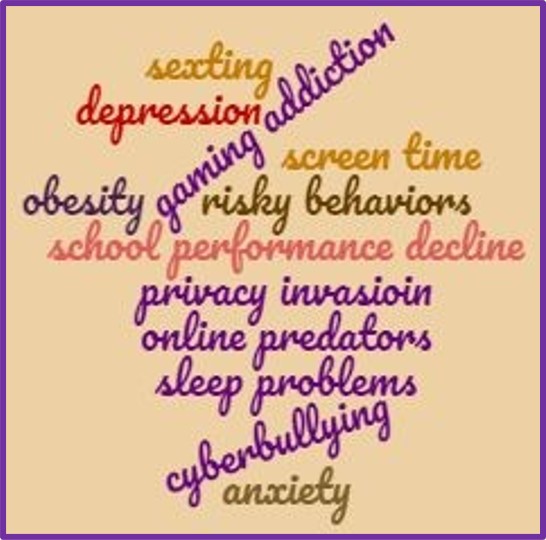
AAP includes tips for developing your plan and a series of articles on the effects of media use on children and teens. For example, in Constantly Connected: How Media Use Can Affect Your Child, AAP (2022) noted several risks to children and teens related to an overuse of digital media and screens. There's the potential for obesity, sleep problems, problematic internet use (e.g., Internet gaming disorder, less interest in "real-life" relationships, depression), negative effects on school performance, risky behaviors, sexting, decrease in privacy, predators who exploit youth via social networking, chat-rooms, e-mail and online games, and cyberbullying.
See Screen Time Guidelines by Age as recommended by AAP. The chart is a quick reference of recommendations for age groups: below 18 months (none), toddlers (little to none), preschoolers (up to one hour per day), elementary school aged (up to 1-1.5 hours per day), middle school aged (up to 2 hours per day), everyone in the family, and managing screen time at home.
HOT! Parenting Children in the Age of Screens from the Pew Research Center includes results of their 2020 study. The "report focuses on how children engage with digital technologies, screens and social media, as well as parents’ attitudes about these behaviors, their concerns about their child’s use of technology, and their own assessment of their parenting and experiences with digital tech. These findings are based on a survey conducted March 2-15, among 3,640 U.S. parents who have at least one child or children ages 17 and under" (How we did this section).
 Here's
an idea: Have your students or kids keep a record of how many
minutes in a week that they are using their technology devices and what they
are using them for, including for social
media. You and they might be surprised. Then challenge them to
reduce the number of those minutes. Teachers and parents,
you can join in, too.
Here's
an idea: Have your students or kids keep a record of how many
minutes in a week that they are using their technology devices and what they
are using them for, including for social
media. You and they might be surprised. Then challenge them to
reduce the number of those minutes. Teachers and parents,
you can join in, too.
The use of technology has also brought about a rise in multitasking. The rapid way in which ideas become freely available, the desire to get that information quickly, and the instantaneous way of switching from one source to another potentially affects learning in yet other ways. While Schmidt (2010) noted benefits of technology (e.g., online gaming improves strategic reasoning, navigational reasoning, and hand-eye coordination), he voiced a concern that people might be losing deep-reading skills, as they spend less time reading long-form literature passages. This probably has an effect on cognition and reading, although no one really knows what that does.
In Gasser and Palfrey's (2009) view, multitasking is not going to go away. It helps today's youth to cope with the vast amount of information coming their way. It takes on a couple of forms: parallel processing or doing more than one thing at the same time and task-switching or quickly changing from doing one thing to doing another. Rather than preventing our students from multitasking, a better approach would be to help students understand how multitasking challenges their learning. After reviewing several studies on the affects of multitasking, Gasser and Palfrey concluded:
Multitasking and participatory learning can be seen in the online activities of youth, many of whom benefit from the informal settings and activities they have defined for themselves. In what has been called "the most extensive U.S. study of youth media use" to date, Mizuko Ito, Heather Horst, Matteo Bittanti, Danah Boyd, Becky Herr-Stephenson, Patricia G. Lange, C.J. Pascoe, and Laura Robinson (2008) found that youth use online media to extend friendships and interests. They engage in peer-based, self-directed learning online (pp. 1-2). The scenario has implications for instructional designers and educators:
Commenting on results of a Pew Internet & American Life Project report, psychology professor Larry Rosen (2013) pointed out the multitasking with technology that learners do also can negatively affect academic performance in school as learners are unable to focus for long periods of time on any one task. They might be only able to stay on task for as little as 3-5 minutes before being distracted by such things as having multiple devices in their study environments, texting, and using Facebook (p. 62).
Jeffrey Kuznekoff and Scott Titsworth (2013) provided additional evidence on the negative affect on academic performance of learners using mobile devices during class lectures. They found that "Students who were not using their mobile phones wrote down 62% more information in their notes, took more detailed notes, were able to recall more detailed information from the lecture, and scored a full letter grade and a half higher on a multiple choice test than those students who were actively using their mobile phones" (p. 233). They suggested informing students of the results of their research, perhaps including a short summary of it within a course syllabus as a way to help learners make a more informed decision on potential impact on their learning of using mobile phones during class lectures. Yet this might not be enough to convince learners that results might apply to them.
So how should educators facilitate young people's engagement with digital media? The key is teaching learners how to focus using a process in instruction involving "technology breaks." According to Rosen (2013):
A tech breaks starts with the teacher asking all students to check their texts, the web, Facebook, whatever, for a minute and then turn the device on silent and place it upside down on the desk in plain sight and to "focus" on the classroom work for 15 minutes. The upside-down device prohibits external distractions from vibrations and flashing alerts and provide a signal to the brain that there is no need to be internally distracted, because an opportunity to "check in" will be coming soon. (p. 64)
At the end of the focus time, the tech break begins again, and the cycle continues. Teachers might begin with a focus time of about 15 minutes, gradually increasing the focus time between tech breaks. However, they might find the maximum focus time might reach about 30 minutes. Rosen indicated that this technique has also proved successful at the dinner table at home or in restaurants, and during business meetings.
Technology has also contributed to a rise in informal learning, or at least has made it more evident. While content and courses are still viewed as the starting point of learning, George Siemens (2005a) indicated that the Web and the Internet are changing that. Proof of this is illustrated in Ito and colleagues' study on living and learning with new media (2008) and in Lemke and Coughlin's view that the Internet has been a change agent for democratization of knowledge (2009).
Per Siemens (2005a), the majority of education no longer occurs in formal settings. People are learning "through communities of practice, personal networks, and through completion of work-related tasks" in an environment in which "[k]now-how and know-what is being supplemented with know-where (the understanding of where to find knowledge needed)" (Introduction section). Thus, he viewed making connections, not content, should be perceived as the beginning point of the learning process.
Siemens' "connectivism" theory calls for a rethinking of learning in the digital age, illustrating that technology has led to new learning theory. To date theories of behaviorism, cognitivism, and constructivism have dominated instructional design and still have their place in the domains of learning (see Table 1). However, those theories are challenged in the digital age because "[m]any of the processes previously handled by learning theories (especially in cognitive information processing) can now be off-loaded to, or supported by, technology" (Siemens, 2005a, Introduction). In contrast to established theories of learning, the essence of connectivism is that learning is viewed as a connections/network-forming process (Siemens, 2005c).
Connectivism recognizes that learning resides in a collective of individuals' opinions and even in non-human appliances. Core skills include an ability to see connections between fields, ideas, and concepts and to locate sources of unknown knowledge when you need it at its point of application. The intent of learning activities is currency (accurate, up-to-date knowledge). Because knowledge is increasing exponentially, it can rapidly change what is perceived as a reality. Thus, the decision making process (what to learn and its meaning) is a learning process itself (Siemens, 2005a). The process is complicated by new communications tools that have sprung up, which give greater end-user control over what is published on the Web, resulting in some amateur contributions of questionable quality.
| Table 1: Learning Domains with Associated Theories | |
| Learning Domain & Percent of learning over a lifetime contributed by the domain | Associated Theories & Traits |
| Transmission: Learning as instructor led courses, lectures, demonstrations; about 10% |
Behaviorism & Cognitivism: High organizational control over content and structure; Learning is mastering pre-determined objectives; developmental and formative learning occurs; formal learning |
| Emergence: Learning as reflection and cognition; about 1-2% |
Cognitivism & Constructivism: High personal control over content and structure; Learning is learner constructed; personal learning and innovation occur; informal learning |
| Acquisition: Learning as self-selected (e.g., exploring, experimenting, self-instruction, inquiry, satisfying a curiosity); about 20% |
Constructivism & Connectivism: High personal control over content with some personal control over structure. Learning is learner motivated, collaborative; involves a variety of sources; group and needs-based learning occurs; informal learning |
| Accretion: Learning as continual/embedded process; often subliminal or unconscious (e.g., accounting for learning of language, culture, habits, prejudices, social rules, behaviors); about 70% |
Connectivism: High personal control over content with high organizational control over structure; Learning in a network; knowing-where to find information is valued; connection-making; informal learning |
Sources for content and percentages adapted from: Siemens, G. (2005). Learning development cycle: Bridging learning design and modern knowledge needs. Elearnspace. Wilson, L. O. (1997). The four types of learning. https://thesecondprinciple.com/optimal-learning/types-of-learning/ |
|

HOT: See the Great Wheel of All the Learning Theories that Teachers Need to Know About This interactive graphic shows the learning theorists, key concepts of their theories, learning paradigms or "world views," and the scientific disciplines associated with those.
Learning-Theories.com "features more than 80 learning theories, models, and frameworks that address how people learn." Summaries are extensive on each.
Ultimately, the value of the theory of connectivism is its link to the concept of life-long learning and personalization of it. According to Siemens (2005c), "We are moving from formal, rigid learning into an environment of informal, connection-based, network-creating learning...Knowing is no longer a destination. Knowing is a process of walking in varying degrees of alignment with a dynamic environment" (Conclusion section). Gone are the days of "this is what it is."
Personalization is a hot topic among educators. But what is personalization? One definition proposed in The Glossary of Education Reform (2015) states:
"The term personalized learning, or personalization, refers to a diverse variety of educational programs, learning experiences, instructional approaches, and academic-support strategies that are intended to address the distinct learning needs, interests, aspirations, or cultural backgrounds of individual students." It's generally viewed as an alternative to "one-size-fits all" instruction and has also been called "student-centered learning" (para 1).
Personalization is among trends driving the global economy, and this is no less true when working with technology, and the internet. However, as Benjamin Riley (2017) noted, "We need to stop treating technology use and personalization as synonymous" (p. 72). To-date there has been multiple interpretations of personalized learning, a lack of a common definition of it, and almost no evidence thusfar from rigorous research in support of it. In his view, common principles to many definitions of personalized learning include students having greater control over the content they learn and the pace at which they learn, and some use of technology to customize learning (Riley, 2017).
Regardless of one's definition, Scott Johns and Mike Wolking (n.d.) noted the following Core Four of Personalized Learning developed at Education Elements:
For personalized learning to really take-off in classrooms, technology will need to be a component. Per Thomas Greaves (in Demski, 2012), the most effective implementations include a "well-implemented 1-to-1 laptop initiative," "learning management systems ...because they provide the framework that supports several different personalization functions without adding a lot of extra work for the teacher," "access to online remedial coursework," and "open access to search tools" (p. 35).
However, consider the conclusion Paul France (Waters, 2018) reached after being actively involved with implementing personalized learning with technology for several years: “The vision was a curriculum that catered to every child so they’re learning at their level all the time,” he said. “But when every child is working on something different, you’re taking away the most human component in the learning process, which is social interaction—learning from one another and collaborating to solve problems. They’re developing a relationship with their tablet but not with each other” (para. 13). Waters (2018) also noted challenges from a RAND report: "Helping students work at their own pace can make group projects and collaboration more difficult because students are at different places, while also making it harder to prepare kids for year-end standardized tests" (para. 7).
If schools opt for personalized learning, according to Siemens (2005b), instructional designers should consider learning ecologies and networks, as they are structures that enable continual and personalized learning. Learning communities, information sources, and individuals can all be considered nodes or connection points in a network and it only takes two nodes to share resources. Such networks need to occur within an ecology, which means that the approach to learning is open, adaptive, decentralized, tolerates experimentation/failure, reflects a need for simplicity, promotes trust and learning in safe environments, and includes many tools for dialogue and making connections. A learning ecology includes the following (Siemens, 2005b, Learning Ecology section):
"Each of the following types of learning can be personalized for and by students, in part by adjusting the instruction, complexity, and level of authenticity" per Cheryl Lemke (2014):
- Drill and Practice
- Blended Learning (a Combination of F2F plus Apps/Objects, Video, Intelligent Adaptive Learning, etc.)
- Productivity Tools (word processors, spreadsheets, presentation software, etc.)
- Organizational Tools Enabling Self-Directed Learning
- Online Research
- Communication Tools (including video, audio, and text, etc.)
- Virtual Learning
- Visual Thinking/Learning Tools
- Collaboration/Social Networking and Media
- Online and Embedded Assessment
- Construction Tools/Game Creation
- Problem Solving/ Data Analysis
- Virtual Worlds/Serious Games/Simulations (Lemke, 2014)
A true personalized learning environment (PLE) "draws on a variety of discrete tools, chosen by the learner, which can be connected or used in concert in a transparent way. ... a PLE is not simply a technology but an approach or process that is individualized by design, and thus different from person to person. It involves sociological and philosophical considerations and cannot be packaged, passed out, and handed around as a cell phone or tablet computer could. Widespread adoption of PLEs ... will almost certainly also require a shift in attitudes toward technology, teaching, and learning" (Johnson, Adams, & Haywood, 2011, p. 30).
Widespread adoption requires more than attitude shifts, however. There are multiple challenges in evolving from our traditional way of delivering education to a personalized system. To have a chance at success, Gross and DeArmond (2018) stated:
"Successful innovation and scaling requires that innovators have (1) a clear understanding of what they hope to accomplish—what problem is being solved and some way of knowing when they get there; (2) the flexibility and opportunity to take risks; and (3) strategies to learn through iteration. If the goal is to innovate and learn as an organization, then innovators also need (4) processes and procedures for gathering what is learned, codifying it, and transferring this information to others." (p. 14)
Before undertaking any implementation, Tomlinson (2017) suggested that educators reflect on why they want to implement personalized learning and have a vision for its purpose. How will this approach match with curriculum? "It's unwise to select an instructional direction without clarity about how compatible that direction is with local understandings about the nature of curriculum" (p. 13). Personalization might not work for all students in a school, or even in a classroom, or particular content area. For example, consider how you would provide quality educational experiences for learners challenged by "language acquisition, low proficiency in reading, emotional insecurity, a lack of background experiences, or even a weak attention span" (p. 14). Consider the affect of its implemenation on existing systems, such as schedules, grading practices, and teacher evaluations, particularly if teachers can opt in or out of the approach. What supports will teachers need logistically in the classroom, from professional development, and from school leadership? How will you involve parents in the change process? What changes would be needed in the school environment--would they conflict with any district or state-level mandates or expectations? (Tomlinson, 2017).
Based on outcomes from a 2014 national summit on this topic hosted by the Friday Institute for Educational Innovation at North Carolina State University (Abbott, Basham, Nordmark, Schneiderman, Umpstead, Walter, & Wolf, 2014), key components in a redesigned personalized learning system would include mass customization; flexible, anytime, everywhere learning; a teacher role as "guide-on-the-side"; project-based, authentic learning; a student-driven learning path; and a mastery/competency-based progression/pace. We would need collaborative learning environments, "ongoing, embedded, and dynamic assessments of knowledge/skills, learning styles, and interests," and rather than a fixed-limited report card, we'd need portable electronic portfolio records, and integration of informal learning (pp. 2-3). It would require greater use of data, changes in curriculum, funding, policies, an enhanced technology architecture to access and manage data, content and communications; new research and development for what works for which students in a PLE, and new professional learning experiences, such as with differentiated instruction and blended learning instructional models (p. 5).
Readers should not confuse "mass customization" with lack of standards. In a PLE, "each learner works toward achieving the same set of college- and career-ready standards with the support that they need along the way" (Friend, Patrick, Schneider, & Vander Ark, 2017, p. 5). Despite its challenges, classroom teachers and schools are implementing personalized learning, as Friend and his colleagues illustrated. Although there are differences in approaches, commonalities exist such as "kids learning individually and together, a combination of small group and whole group activities, demonstrations and instruction from the teacher, meaningful projects, extracurricular activities and more" (p. 6).
Mastery/competency-based progression/pace, a key component just noted in a personalized learning system, is under scrutiny in the research on learning. Soloway and Norris (2015) pointed out A Fundamental Flaw in Competency Learning, which centers around the difference between performance and learning. Algorithms used to determine if students have mastered content are based on performance (e.g., the number of questions answered correctly on a quiz/test), and there is no guarantee that learning has taken place. "The implications of this distinction are critical for competency learning. The computer algorithms used in competency learning implementations are not assessing the long-term changes in understanding and skills that are the hallmark of learning. Rather, the computer algorithms are — by necessity — assessing performance" (p. 2 online). For more on this topic, read:
Patrick, S., & Sturgis, C. (2015). Maximizing competency education and blended learning: Insights from experts. Vienna, VA: International Association for K–12 Online Learning. https://aurora-institute.org/resource/maximizing-competency-education-and-blended-learning-insights-from-experts/
Riley (2017) believes principles of personalized learning conflict with some basic principles of cognitive science and how people learn. In terms of giving students greater control over the content they learn, "Students who pull content from the Internet as a central part of their learning may be able to make short-term use of the facts they encounter, but unless they've somehow stored these facts in long-term memory -- a process unlikely to happen by chance -- they won't have really learned them" (p. 71). In relation to students being given control over the pace of their learning, most students need help of teachers to "make sure students are getting their mental excercise at the appropriate pace" (p. 71). The bottom line:
"[S]chools that implement personalized learning often find they need to create "guardrails" or frameworks around the content students are supposed to learn and the pace at which they learn it. In other words, schools start to converge on a model not all that different from longstandng education models with a scope and sequence" (Riley, 2017, p. 71).
Readers might be interested in the following on personalized learning:
HOT!: Education Elements: Personalized Learning Guide is a comprehensive guide for educators, administrators, and parents.
Fred Keller and his Personalized System of Instruction posted by Athabascau University in Canada elaborates on this method, which Keller first proposed in the 1960s. It includes five features:
Penuel and Johnson's (2016) Review of Continued Progress: Promising Evidence on Personalized Learning is a critique of the 2015 RAND Corporation research on three school-wide initiatives involving 62 schools promoting personalized learning. Overall, the reviewers concluded the research had many high quality elements; however, owing to its limitations, "Broad conclusions regarding the efficacy of technology-based personalized learning ... are not warranted by the research" (p. 1).
John Pane's (2018) Strategies for Implementing Personalized Learning While Evidence and Resources Are Underdeveloped is a report from the RAND Corporation. Pane offers "strategic guidance for designers of personalized learning programs to consider while the evidence base is catching up. This guidance draws on theory, basic principles from learning science, and the limited research that does exist on personalized learning and its component parts" (p. 1). A key reason for such guidance includes that "Presently, early implementers of personalized learning are working with imperfect evidence, underdeveloped curricular resources, and policies that might hinder their efforts" (p. 9).
Jennifer Barnett (2011) provided a few tips in High-Tech Teaching in a Low-Tech Classroom. Among those are the following ideas:
In the pass-it-on buddy method, students assist one another in creating the digital product. Barnett stated, "Choose and prepare the best technological tool to fit your learning target. Students complete an assignment on paper (for example, writing text for a blog entry). Teach one student to translate their work into a digital product. Schedule a buddy system: Student A teaches student B, student B teaches student C, and so on." Great for group work.
In the group consensus method, "Small groups of students engage in dialogue on a particular topic, then a member uses a digital tool to report on the group's consensus."
In the rotating scribe method, "Each day, one student uses technology [of his/her choice] to record the lesson for other students." Begin by modeling the process. "Then have the student record what happened in class: activities, explanations, student questions, discussion, etc. Review the scribe’s work after class. Begin class the next day by asking students to "evaluate" the scribe's report."
In a whole class method, the group (or half of the class at a time) gathers around the computer to explore web sites, tools, games, videos, interactive quizzes, and so on. Groups can "share results, scores, impressions, or other information with each other." Post resources on a class web site, so that students might explore at home. Provide time in class for individuals to explore and then share their findings at the end of a unit. Let the group decide on the best discovery and then reward the student who made the discovery.
Great tips! Read the article for additional details.
Personalization, differentiation and individualization are buzzwords in
education and have been elaborated upon and defined in various publications. In
the 2010 National Education Technology Plan, Transforming American Education: Learning Powered by
Technology, the U.S. Department of Education defined them as follows:
Individualization refers to instruction that is paced to the learning needs of different learners. Learning goals are the same for all students, but students can progress through the material at different speeds according to their learning needs. For example, students might take longer to progress through a given topic, skip topics that cover information they already know, or repeat topics they need more help on.
Differentiation refers to instruction that is tailored to the learning preferences of different learners. Learning goals are the same for all students, but the method or approach of instruction varies according to the preferences of each student or what research has found works best for students like them.
Personalization refers to instruction that is paced to learning needs, tailored to learning preferences, and tailored to the specific interests of different learners. In an environment that is fully personalized, the learning objectives and content as well as the method and pace may all vary (so personalization encompasses differentiation and individualization). (p. 12)
These definitions above focus on instruction, rather than the learner, in the view of Barbara Bray and Kathleen McClaskey. They elaborated on the learner and these terms in their report on Personalization vs Differentiation vs Individualization (2013). For example, personalization is learner-centered in that "the learner drives their learning", and differentiation and individualization are teacher-centered. For differentiation, the teacher "provides instruction to groups of learners." For individualization, the teacher "provides instruction to an individual learner." Personalization assessment involves "Assessment AS and FOR learning, with minimal OF learning." Differentiation involves "Assessment FOR learning and OF learning" and individualization involves "Assessment OF learning" (Chart Version 3). The chart on the differences is worth viewing.
 Personalized Learning:
A Guide for Engaging Students with Technology
by Peggy Grant and Dale Basye (2014) includes what you need to know to
implement personalized learning with technology in your school setting.
You'll learn why personalized learning is important and how it differs from
differentiation and individualized learning, how personalization relates to
the Common Core standards, and how personalization can transform teaching
via the models of technology integration presented. Assessment in a
personalized environment is addressed, along with policies and perspectives
that make 1:1 and mobile device initiatives successful. The book
concludes with funding information and a planning process for a 1:1
personalized learning program.
Personalized Learning:
A Guide for Engaging Students with Technology
by Peggy Grant and Dale Basye (2014) includes what you need to know to
implement personalized learning with technology in your school setting.
You'll learn why personalized learning is important and how it differs from
differentiation and individualized learning, how personalization relates to
the Common Core standards, and how personalization can transform teaching
via the models of technology integration presented. Assessment in a
personalized environment is addressed, along with policies and perspectives
that make 1:1 and mobile device initiatives successful. The book
concludes with funding information and a planning process for a 1:1
personalized learning program.
Educators have also been hearing about the buzzword
"adaptive learning" in connection with products from ed
tech companies and publishers (e.g., see
Curriculum Associates i-Ready
Personalized Instruction and Dreambox Learning). However, the term is not
the same as "personalized learning." Per John Waters
(2014), adaptive learning is "an approach to instruction and
remediation that uses technology and accumulated data to provide
customized program adjustments based on an individual student's
level of demonstrated mastery" (online p. 1).
Per K-12 Blueprint (2016), there are several types of adaptive learning products on the market today. For example, software might be interactive and self-paced; adaptive at the content level; adaptive at the assessment level; adaptive at both assessment and content levels; or include adaptive assessment and content with high granularity. High granularity would include the student recording each step used in solving the problem and feedback would also address the steps used by comparing those to effective methods for solving the problem.
K-12 Blueprint includes multiple tools to help you learn more about personalized learning and adaptive learning.
Technology is not required for personalization, the latter of which educators have been doing for decades. Read more in Adaptive Learning: Are We There Yet? (Waters, 2014) at THE Journal.
In A systematic literature review of personalized learning terms, Atikah Shemshack and Jonathan Spector (2020) analyzed the terms that have been associated with personalized learning, including adaptive learning, individualized instruction, and customized learning. They noted that "Adaptive instruction, blended instruction, differentiation, customized instruction, individualized learning, adaptive learning, proactive supports, real-world connections, and applications are hallmarks of good personalized learning" (p. 6).
Hongchao Peng, Shanshan Ma, and Jonathan Michael Spector (2019) explored a combination of personalized and adaptive learning in Personalized adaptive learning: An emerging pedagogical approach enabled by a smart learning environment. After analyzing each, they proposed a framework for the combination, indicating "personalized adaptive learning could be constructed from the following four aspects, namely, learner profiles, competency-based progression, personal learning, and flexible learning environments" (Abstract section). They defined personalized adaptive learning "as a technology-empowered effective pedagogy which can adaptively adjust teaching strategies timely based on real-time monitored (enabled by smart technology) learners’ differences and changes in individual characteristics, individual performance, and personal development" (Core concepts section, p. 6).
In
his policy brief,
Personalized Instruction: New Interest, Old Rhetoric,
Limited Results, and the Need for a New Direction in Computer-Mediated
Learning, Noel Enyedy (2014) noted promoters and vendors of technological
systems often use the terms personalized instruction and
personalized learning interchangeably; however, the terms differ:
Personalized instruction focuses on tailoring the pace, order, location, and the content of a lesson uniquely for each student ... It is a rebranding of the idea of individualized instruction first promoted in the 1970s, before the widespread availability of personalized computers.
Personalized learning, on the other hand, places the emphasis on the process of learning as opposed to attending exclusively to the delivery of content. Personalized learning refers to the ways teachers or learning environments can vary the resources, activities, and teaching techniques to effectively engage as many students as possible ... This interpretation of "personal" does not imply that each student receives a unique educational experience, but instead that students are provided with multiple entry points and multiple trajectories through a lesson. (Enyedy, 2014, p. 3)
In the National Education Technology Plan 2017 update, the U.S. Department of Education (2017) referred to personalized learning as "instruction in which the pace of learning and the instructional approach are optimized for the needs of each learner. Learning objectives, instructional approaches, and instructional content (and its sequencing) all may vary based on learner needs. In addition, learning activities are meaningful and relevant to learners, driven by their interests, and are often self-initiated" (p. 9).
Per Enyedy (2014), "the vast majority of systems on the market today fall into the category of Personalized Instruction" (p. 3). There is "so much variability in features and models for implementation that it is impossible to make reasonable claims about the efficacy of Personalized Instruction as a whole" (p. 5). For example, among features that might vary in personalized instruction systems are student choices (e.g., students might be given control of pace, when and where they learn, what topics to study, what resources to use) or teachers might make those choices for students. Personalized instruction might involve adaptive learning systems and/or intelligent tutoring systems where some of the control is given to the computer system itself with student performance on assessments being used to direct them to topics or resources. Variables in implementation models of personalized instruction include online instruction and blended instruction.
In
Personalized Learning and the Digital Privatization of Curriculum and
Teaching, Faith Boninger, Alex Molnar and
Christopher Saldana (2019) of the University of Colorado Boulder elaborated
on the concerns. The authors began their report stating:
"Personalized learning is a hot topic, garnering policymaker interest, media attention, and widespread school implementation. Much of this is driven by focused philanthropic funding (e.g. the Bill and Melinda Gates Foundation and the Chan Zuckerberg Initiative), the advocacy of large digital platforms (e.g., Facebook and Google) and tech industry trade associations, and investors anxious to cash in on the school market" (p. 7).
"In terms of pedagogy, the digital products that corporations market as an integral part of personalized learning can undermine the ability of educators to provide students with engaging and educative school experiences. Such products subtly subvert teachers’ ability to control their classroom pedagogy, moving pedagogical control to vendors and programmers—thus, in effect, privatizing consequential educational decision-making. Digital products also tend to require massive amounts of continuously collected data, the existence of which threatens to compromise teacher and student privacy" (p. 8).
The report includes a historical context of personalized learning, key assumptions underlying personalized learning, issues raised by tech-centric personalized learning (e.g., narrow understandings of children's agency, learning, culture), the role of venture capital, threats posed by tech-centric personalized learning, and the weak research base. Among conclusions and recommendations is that "schools and policymakers pause in their efforts to promote and implement personalized learning until rigorous review, oversight, and enforcement mechanisms are established." States might establish an "independent governmental entity" with "regard to data gathered and or stored by digital means" (p. 25). Recommendations for the responsibilities of this entity are included.
The K-12 Horizon Reports lend support to views expressed above. Written as a joint effort of the New Media Consortium and the Consortium for School Networking (CoSN) with funding from Microsoft, the reports examined "emerging technologies for their potential impact on and use in teaching, learning, and creative expression within the environment of pre-college education" (Johnson, Levine, Smith, & Smythe, 2009, p. 3). The following were predictions from the 2009 report for technology adoptions that will change the learning process in the near future:
In one year or less: collaborative environments and online communication tools. Johnson, Levine, Smith, and Smythe (2009) indicated, “both groups of technologies are now standard in the digital toolset of postsecondary students. In many grade schools, on the other hand, integrating these kinds of technologies into teaching and learning has proven difficult because of barriers such as policy constraints on using online tools, the fact that many students do not bring laptops to school (as opposed to many college students, who do), and policies that restrict Internet access in many schools” (p. 4).
Within two to three years, mobiles and cloud computing. This time estimate "is a reflection of the fact that younger students are, at present, less likely than college-age students to carry mobile devices, especially Internet-capable ones — although there is a growing trend that suggests this will not always be the case — and that access to cloud-based applications is more difficult for younger students for the same reasons that collaborative environments and online communication tools are often out of reach” (p. 4). Note that cloud computing refers to large groups of networked servers, which have "made processing power and storage capacity available in abundant quantities. Applications that are developed to run in the cloud and take advantage of the ability to scale up or down along with the number of users and storage demands are changing the way we think about programs and files. Collaborative work, research, social networking, media sharing, virtual computers: all are enabled by applications that live in the cloud” (p. 5).
In four to five years, smart objects and the personal web. Smart object appliances aimed at consumers are appearing on the market, and the technology shows promise for linking physical objects with rich caches of online content, but common use in schools is still several years away. The technology was placed on the same horizon in the higher education edition of the 2009 Horizon Report. The personal web, on the other hand, is perceived as being slightly closer to mainstream adoption in higher education than in grade schools; the topic appears on the mid-term horizon for higher education” (p. 4).
From the 2010 K-12 Horizon Report, Johnson, Levine, Smith, and Haywood (2010) noted that cloud computing and collaborative environments remain as top emerging technologies for adoptions within 2010-2011, followed by interest in and rise of adoptions of game-based-learning and mobiles within two to three years from 2010. On a further horizon, set for four to five years away from 2010, adoptions of augmented reality and flexible displays were predicted, which are elaborated on within this report. Of key interest is that technology integration is challenged by the fundamental structure of K-12 education. Unfortunately, many activities related to learning and education that take place outside the school setting are often undervalued or not acknowledged.
Table 2 contains comparisons of emerging technologies from K-12 Horizon Reports dating back to 2009. Notice that the 2011, 2013, and 2014 reports included the emergence of learning analytics. In 2015, adaptive learning technologies appeared. For more on learning analytics and adaptive learning, consult the following:
Society for Learning Analytics Research (SoLAR) has numerous resources on learning analytics. For example, in What is Learning Analytics? SoLAR stated: "As a research and teaching field, Learning Analytics sits at the convergence of Learning (e.g. educational research, learning and assessment sciences, educational technology), Analytics (e.g. statistics, visualization, computer/data sciences, artificial intelligence), and Human-Centered Design (e.g. usability, participatory design, sociotechnical systems thinking)" (About section). Its publications include the Journal of Learning Analytics and the Handbook of Learning Analytics with downloadable chapters.
U.S. Department of Education, Office of Educational Technology. (2012). Enhancing teaching and learning through educational data mining and learning analytics: An issue brief. Washington, D.C.: Author. https://files.eric.ed.gov/fulltext/ED611199.pdf
Pearson & EdSurge. (2016). Decoding adaptive. https://www.pearson.com/content/dam/one-dot-com/one-dot-com/global/Files/about-pearson/innovation/open-ideas/DecodingAdaptive.pdf. This document provides a definition of adaptive learning and a framework for understanding it. A list of 24 tools is also included and where each adapts.
| Table 2: Emerging Technologies Predicted in K-12 Horizon Reports 2009-2017* | |||
| Time to Adopt | 1 yr. or less | 2-3 yrs. | 4-5 yrs. |
| 2009 | Collaborative environments and online communication | Mobiles and cloud computing | Smart objects and the personal web |
| 2010 | Cloud computing and collaborative environments | Game-based learning and mobiles | Augmented reality and flexible displays |
| 2011 | Mobile apps and cloud computing | Game-based learning and open content | Personalized learning environments and learning analytics |
| 2012 | Mobile devices and apps; and tablet computing | Game-based learning and personal learning environments | Augmented reality and natural user interfaces |
| 2013 | Cloud computing and mobile learning | Learning analytics and open content | 3D Printing; remote and virtual laboratories |
| 2014 | BYOD (Bring Your Own Device) and cloud computing | Games and Gamification; and learning analytics | The Internet of Things** and wearable technology |
| 2015 | BYOD and makerspaces | 3D printing and adaptive learning technologies | Wearable technology and digital badges |
| 2016 | Makerspaces and online learning | Robotics and virtual reality | Artificial intelligence and wearable technology |
| 2017 | Makerspaces and robotics | Analytics technologies and virtual reality | Artificial intelligence and the Internet of Things |
Sources: K-12 Horizon Reports, 2009-2017. Available at https://library.educause.edu/resources/2017/12/horizon-report-k-12-edition-2009-2017 *Note: The last K-12 Horizon Report was in 2017. Educause took over the New Media Consortium as of February 2018. **To learn more about the IoT, view the video and read more: Everything You Need to Know about the Internet of Things Right Now from ZDNet (2020). NOTE: Driving K-12 Innovation is the successor to the New Media Consortium’s “Horizon K-12” reports. This is an initiative of the Consortium for School Networking. CoSN's goal is to produce three shorter reports each year for the K-12 segment that focus on Hurdles, Accelerators, and Tech Enablers. Those reports began in 2019 and are available at https://www.cosn.org/edtech-topics/driving-k-12-innovation/. See Table 4 below for the Tech Enablers. |
|||
Cyberlearning researchers are also investigating the future of learning with technology. They are "oriented toward a technical and educational horizon approximately 10 years in the future" (Roschelle, Martin, Ahn, & Schank, 2017, p. 1). In their Cyberlearning Community Report, Roschelle and colleagues summarized six emerging genres (Table 3) and provided resources and examples throughout.
| Table 3: Emerging Genres on the Horizon 2017 and Approximately 10 years in the Future | |
| Genre & Description* | Resources/ Examples |
| Community Mapping: "Using mobile, geospatial tools for learning in context at the scale of a neighborhood, community, or city." |
Smart and Connected Communities for Learning. |
| Expressive Construction: "Computing as a creative literacy, focusing on students’ expressiveness, ability to represent STEM ideas, and sharing of emerging understandings." |
Cutting Edge of Informal Learning: Makers, Mobile, and More! |
| Digital Performance Spaces: "Immersive, participatory, social investigations of simulated scientific phenomena that appear to be occupying the entire space of the classroom." |
RoomQuake |
| Virtual Peers and Coaches: "Agents that use verbal and nonverbal communication to establish rapport with a student and thereby support engagement in explaining STEM concepts." |
AI Applications in Education |
| Remote Scientific Labs: "Students control real scientific equipment at a distance, learning about science with authenticity and support." |
Remote Labs |
| Collaborative Learning with Touch Interfaces: "Expanding collaborative learning via multitouch interfaces on tabletop, tablet and mobile computers." |
TouchCounts: Per the website: "In TouchCounts, children use their fingers, eyes and ears to learn to count, add and subtract." |
Source: Roschelle, J., Martin, W., Ahn, J., & Schank, P. (Eds.). (2017). Cyberlearning Community Report: The State of Cyberlearning and the Future of Learning With Technology. Menlo Park CA: SRI International. https://circlcenter.org/resources/community-report/ *Descriptions from p. 2. |
|
For 2020/2021, the eLearning Industry (Bui, 2020) posted ten educational technology trends:
eLearning: The rising demand for eLearning and distance learning was brought about by the spread of COVID-19 and school closures.
Video-assisted learning: Videos enrich learning and can make it more comprehensible. They also improve student outcomes and reduce teacher workload.
Blockchain technology: Benefits to education have to do with data storage and ability to encrypt the data and transmit it over multiple computers. For example, the technology is used in Massive Open Online Courses (MOOCS) and ePortfolios to verify skills and knowledge.
Big data getting bigger: This is allowing instructional designers to personalize learning experiences.
Artificial intelligence: For example, AI allows grading to be automated. It can be found in AI tutoring and providing feedback and progress-monitoring in AI programs.
Learning analytics
Gamification
Immersive learning with virtual reality (VR) and augmented reality (AR)
STEAM-based programs (Science, Technology, Engineering, Art, Math) enable learners to explore real-world problems through hands-on activities and creative design.
Social media in learning (Bui, 2020).
| Table 4: CoSN's Driving K-12 Innovation Tech Enablers 2019 and Beyond | |
| Year | Tech Enablers |
| 2019 | Mobile Devices: Hand-held or wearable devices connected to the internet, such as smartphones and quantified-self sensor technologies |
| Blended Learning: A mix of face-to-face instruction and online learning; also called hybrid learning | |
| Cloud Infrastructure: A virtual infrastructure delivered or accessed via a network or the internet | |
| Extended Reality (XR): XR encompasses augmented, mixed and virtual reality—a collection of technologies that enhance the physical world with interactive digital imagery and graphics. | |
| Analytics and Adaptive Technologies: Technologies that measure, analyze, predict and customize student learning and other factors in student success | |
| 2020 | Digital Collaboration Platforms: (e.g., Google Hangout, Zoom, Padlet, Flipgrid, Voicethread) |
| Tools for Privacy & Safety Online: (e.g., Childnet; Common Sense Media; iKeepSafe; CoSN Cybersecurity) | |
| Analytics and Adaptive Technologies | |
| Cloud Infrastructure | |
| Mobile Devices | |
| 2021 | Digital Collaboration Environments: Synchronous and asynchronous communication tools |
| Untethered Broadband and Connectivity: Enables connected learning—without requiring devices to be physically connected (e.g., via cables) | |
| Blended Learning Tools | |
| 2022 | Digital Collaboration Environments |
| Untethered Broadband and Connectivity | |
| Analytics and Adaptive Technologies | |
| 2023 | Artificial intelligence: (e.g., CoSN's AI in K-12; UNESCO's K-12 AI Curricula) |
| Untethered Broadband and Connectivity | |
| Rich Digital Ecosystem: These interconnected systems of online and virtual spaces can span formal school settings and beyond. | |
| 2024 | Generative Artificial Intelligence (GAI) "Generative AI refers to a type of artificial intelligence system designed to generate new content such as text, images, audio, or video in response to user prompts. Unlike other AI systems that focus on pattern recognition or classification, Gen AI can create new and original content that closely resembles human-created content" (CoSN, 2024, p. 26). See: K-12 Generative AI Readiness Checklist from the Council of the Great City Schools and CoSN. |
| Analytics and Adaptive Technologies | |
| Rich Digital Ecosystem | |
| 2025 | Generative Artificial Intelligence |
| Analytics and Adaptive Technologies | |
| Untethered Broadband and Connectivity | |
Sources: Consortium for School Networking: Driving K-12 Innovation / Hurdles & Accelerators; Tech Enablers (2019-2025). https://www.cosn.org/edtech-topics/driving-k-12-innovation/ *Descriptions and examples are taken from the respective year reports on tech enablers. |
|
To further keep abreast of how technology is changing the learning process, visit MindShift, which explores "the future of learning in all its dimensions. [You'll learn] how learning is being affected by technology, discoveries about the brain, poverty, inequities, mindfulness, agency, social and emotional learning, assessments, game-based learning and music, among many other topics." Mindshift also reports "on shifts in how educators teach as they apply innovative ideas to help students learn, while meeting the rigorous demands of their standards" (About Mindshift section).
Technology (e.g., computers of all kinds, Web 2.0 and the social internet) is changing the learning process within mathematics education in ways Lemke and Coughlin (2009) noted (i.e., democratization of knowledge, participatory learning, authentic learning and multimodal learning) and in consideration of Siemens (2005c) theory of connectivism.
In terms of authentic learning, computers enhance the process of mathematics education by eliminating the need for learners to perform all calculations by hand and enabling them to explore "richer" real-world problems that they will encounter in everyday life and in the workplace. Indeed, in his 2010 TED talk, Teaching Kids Real Math with Computers, Conrad Wolfram of Wolfram Research said "the part of math we teach — calculation by hand — isn't just tedious, it's mostly irrelevant to real mathematics and the real world." This latter is one of the reasons kids lose interest in math. One might also speculate that another reason kids lose interest in math is due to the nature of many of the apps they download. In the words of France (2020), "the dehumanizing nature of many of these programs reinforces within our students the idea that learning isn’t about personal growth and liberation; instead, it reminds them that their voice is limited and that what’s most important is getting questions right so they can move on to the next level."
Maria Droujkova (2009), developer of Natural Math, formulated a Math 2.0 framework “where mathematical education is viewed within a cultural context, defining learning as taking on roles in communities and networks. Changes in mathematics education, then, are culture shifts that include many events at individual, family, local community and group, and global network levels" (p. 2). This framework considers mathematical authoring; community mathematics; humanistic mathematics; executable mathematics; and psychology of mathematics learning and education (p. 2). In describing these directions, she noted (p. 3):
Tools and practices of user-generated content, as well as the internet participatory trends of co-production, crowdsourcing, and open educational resources can powerfully support mathematical authoring.
For community mathematics, free, well-designed communication platforms such as nings, blogs, wikis, microblogging, forums, aggregators, and distributed content mash-ups can support online and local math clubs and math circles, topical discussion and study communities, and networks growing around a variety of particular math endeavors: competitions, educational philosophies, comic strips, books, or curricula.
. . . Humanistic mathematics approach promotes activities that an audience can enjoy. On the web, this includes infusing mathematics into robust artistic and musical communities; creation and viral spread of appealing math-rich media; and developing newbie-friendly tools and communities supporting authoring of such media.”
. . . Web 2.0 brings several crucial changes to this field of executable mathematics, including zero-cost distribution of virtual manipulatives; an invitation for everybody to create their own math-rich objects through programming or “construction set” mash-up environments; situating math objects in multi-user virtual worlds; and ease of sharing and continuing development in open educational resource communities.
Psychology of mathematics education incorporates theories of teaching and learning, studies and practices of meta-cognition, developmental awareness, and support of emotional well-being such as math anxiety reduction. Web 2.0 requires a shift toward more social views on the psychology of mathematics education and its role, within this framework, of supporting the other four dimensions. (Droujkova, 2009, p. 3)
Math in a Cultural Context (MCC): Lessons Learned from Yup’ik Eskimo Elders from the University of Alaska Fairbanks exemplifies Droujkova's framework. MCC is "a long-term and ongoing set of interrelated federally funded projects. Central to MCC is its long-term collaboration with Yup’ik elders, teachers, and Alaskan school districts to develop culturally based curricular materials, especially supplemental math curriculum for elementary school students." In addition to supplemental math modules for grades 2-6, MCC includes "supporting materials such as DVD clips of teachers’ implementing exemplary lessons, written case studies, a Guide to Implementing MCC, literacy activities and stories that develop cultural, mathematical, and contextual connections for students. Most importantly, most MCC modules have been tested using either a quasi or experimental design with findings repeatedly showing that MCC students outperform comparable control group students who use their regular math curriculum." (MCC About Us section)
Another resource illustrating community mathematics in Droujkova's framework (2009) is the Math Circles Network, a project of the American Institute of Mathematics. The Math Circles are "communities focused on the enjoyment of mathematical problem solving. ... Math Circles can take many forms, including after-school programs for students, professional learning communities for teachers and mathematicians, or groups of parents or families who want to become more involved with mathematics education" (About section).
A Caveat: Overall, Robert Slavin (2009) noted that technology has "typically been used to supplement classroom teaching" in elementary grades with CAI [computer-assisted instruction] being particularly helpful with children's computational skills (pp. 4-5). Technology is being used in teaching mathematics (at least in middle and high schools) in three ways: as supplementary programs to "fill gaps in a learner's knowledge," as core programs "where the computer largely replaces the teacher," and within "computer-managed learning systems that use a computer to assess students and provide teachers with feedback for use in lessons" (p. 5). However, he concluded from his research that there is "limited evidence that ordinary CAI improves math learning." Rather, "there is strong evidence that using effective teaching strategies can make a real difference. Changing the way that children work together, and classroom management and motivation, can improve math outcomes for all students" (p. 5).
Read more about the Math 2.0 framework and its relevance for math education in Dr. Patricia Deubel's article Web 2.0 in Instruction: Adding Spice to Math Education of February 17, 2010, in THE Journal.
Consider reading: Playing with Math: How Math Circles Bring Learners Together for Fun by Ingfei Chen (2015, February 6) posted at KQED MindShift.
What is technological literacy?Various definitions have been proposed for technological literacy.
The International Technology Education Association (ITEEA, 2000) defined technological literacy as the "ability to use, manage, assess, and understand technology" (p. 9). Greg Pearson and A. Thomas Young (2002) stated that it “encompasses three interdependent dimensions--knowledge, ways of thinking and acting, and capabilities," with the goal "to provide people with the tools to participate intelligently and thoughtfully in the world around them" (p. 9). "Although technical competency is not the same as technological literacy, the development of skills in technology can lead to a better understanding of the underlying technology and could be used as a basis for teaching about the nature, history, and role of technology in our lives" (p. 11).
The North Central Regional Educational Laboratory and the Metiri Group (2003) offered a definition of Literacy for the Digital Age. This definition includes basic literacy, scientific literacy, economic literacy, technological literacy, visual literacy, information literacy, multicultural literacy, and global awareness. "Technological literacy is knowledge about what technology is, how it works, what purposes it can serve, and how it can be used efficiently and effectively to achieve specific goals" (p. 15).
Per the State Educational Technology Directors Association (2007), "Technology literacy is the ability to responsibly use appropriate technology to communicate, solve problems, and access, manage, integrate, evaluate, and create information to improve learning in all subject areas and to acquire lifelong knowledge and skills in the 21st century" (p. 1).
In its Framework for 21st Century Learning, the Partnership for 21st Century Skills (2009) defined ICT (information, communications, and technology) literacy as applying technology effectively. Learners should be able to:
Use technology as a tool to research, organize, evaluate and communicate information
Use digital technologies (computers, PDAs, media players, GPS, etc.), communication/networking tools and social networks appropriately to access, manage, integrate, evaluate and create information to successfully function in a knowledge economy
Apply a fundamental understanding of the ethical/legal issues surrounding the access and use of information technologies(section: P21 Framework Definitions Document, pp. 5-6).
From their critical review of the literature using 15 reports, books, and articles on 21st century knowledge frameworks, Kereluik, Mishra, Fahnoe, and Terry (2013) formulated the following definition of digital and information literacy:
It can be defined as the ability to effectively and thoughtfully evaluate, navigate, and construct information using a range of digital technologies and thus to function fluently in a digital world. An important part of this is the ability to effectively seek out, organize, and process information from a variety of media. This form of literacy also includes a component of responsible use of technology and media, an important moral and ethical consideration beyond understanding basic information and communication technology systems and media forms. (p. 130)
The emergence and integration of ICT into instruction and student lives has given new meaning to Bloom's Taxonomy of cognitive objectives. In Bloom's Taxonomy Blooms Digitally, Andrew Churches (2021) discussed a new set of digital verbs for each of the levels in the taxonomy, reflecting new objectives in the road to literacy.
Thus, by integrating technology into K-12 schools, we are assisting with the development of technologically literate citizens. However, schools must also be aware of a conclusion reached by Ito and colleagues (2008): Given the diversity of digital media, "it is problematic to develop a standardized set of benchmarks to measure levels of new media and technical literacy" for our youth (p. 2).
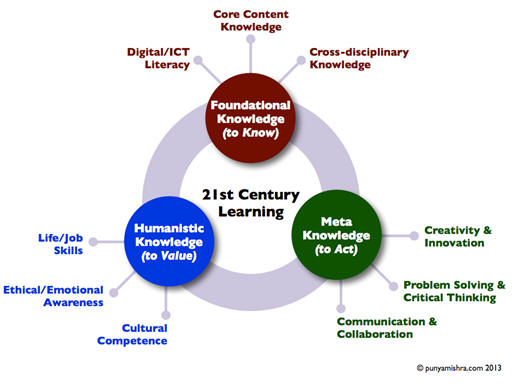
Kereluik, Mishra, Fahnoe, and Terry (2013) also proposed that digital and ICT literacy is just one of nine subcategories within three categories of knowledge necessary for the 21st century: foundational, humanistic, and meta. Foundational knowledge includes digital and ICT literacy, core content knowledge, and cross-disciplinary knowledge. Humanistic knowledge includes job and life skills, ethical and emotional awareness, and cultural competence. Meta knowledge focuses on creativity and innovation, problem solving and critical thinking, and communication and collaboration. Educators need to be aware of the effect of technology on the acquisition of each type of knowledge. The authors recognized that there is some overlap in categories and subcatagories, and viewed foundational, humanistic, and meta knowledge being of equal importance. Their analysis revealed a much needed scheme giving "us a "big picture" of what we mean when we say 21st century learning" (p. 133).
As a resource, consider EasyTech digital literacy curriculum from Learning.com, which is available by content area and grade band for learners in K-8 and high school. It is designed to equip students with the foundational digital skills they need to succeed in online and blended learning environments, including computational thinking, coding, typing, computer fundamentals, online safety, internet use, multimedia, visual mapping, virtual robotics, word processing, spreadsheets, and presentations.
What do we mean by technology integration?There are multiple ways to think about technology integration. According to Johnson, Adams Becker, Estrada, and Freeman (2015, pp. 34-45; 2014, pp. 32-33), there are at least seven categories of technologies, tools, and strategies to help categorize emerging technologies and to serve as lenses into technology integration and innovation:
Consumer technologies find their way into schools because people use them at home, for recreation, or professionally. Examples include 3D video, drones, electronic publishing, mobile apps, robotics, tablet computing, telepresence, and wearable technology.
Digital strategies are ways of using digital devices and software in both formal and informal settings. Among strategies are Bring Your Own Device, the flipped classroom, games and gamification, location intelligence, makerspaces, and preservation/conservation technologies.
Enabling technologies "expand the reach of our tools, and make them more capable and useful, and often easier to use as well" (2014, p. 32). There are multiple examples to illustrate. Among those are cellular networks, electrovibration, flexible displays, geolocation, machine learning, mobile broadband, natural user interfaces, next-generation batteries, open hardware, robotics, speech-to-speech translation, statistical machine translation, virtual assistants, and wireless power.
Internet technologies "include techniques and essential infrastructure that help to make the technologies underlying how we interact with the network more transparent, less obtrusive, and easier to use" (2014, p. 33). Consider technologies such as cloud computing, the Internet of Things, real-time translation, semantic applications, single sign-on, and syndication tools.
Learning technologies are tools and resources designed for education. They "include technologies that are changing the landscape of learning, whether formal or informal, by making it more accessible and personalized" (2014, p. 33). Adaptive learning technologies, badges/microcredit, learning analytics, MOOCs, mobile learning, online learning, open content, open licensing, and virtual and remote laboratories exemplify this category.
Social media technologies are characterized by keywords such as collaborative environments, collective intelligence, crowdfunding, crowdsourcing, digital identity, social networks, and tacit intelligence.
Visualization technologies range from "simple infographics to complex forms of visual data analysis. What they have in common is that they tap the brain’s inherent ability to rapidly process visual information, identify patterns, and sense order in complex situations" (2014, p. 33). Examples include 3D printing/rapid prototyping, augmented reality, information visualization, visual data analysis, and volumetric and holographic displays.
Technology integration, as defined by the National Forum on Education Statistics (2005), Forum Unified Education Technology Suite, "is the incorporation of technology resources and technology-based practices into the daily routines, work, and management of schools" (Part 8). Resources are computers and specialized software, network-based communication systems, and other equipment and infrastructure. Practices include collaborative work and communication, Internet-based research, remote access to instrumentation, network-based transmission and retrieval of data, and other methods.
Software for integration includes a wide variety of applications (Software & Information Industry Association, 2006) that:
Aditi Rao (2013) made a concise comparison of "using technology" versus "technology integration."
To measure the extent of technology integration within your setting, consider the following key questions (National Forum of Education Statistics, 2005, adapted from Part 8):
Use the Technology Integration Matrix, developed by the Florida
Center for Instructional Technology, to determine your level of
technology integration: entry, adoption, adaptation, infusion, or
transformation. Per its description, the 25 cells in the matrix incorporate
"five interdependent characteristics of meaningful learning
environments: active, collaborative, constructive, authentic, and
goal-directed." Each cell includes a link to one or more
videos that show technology integration in classrooms where only a
few computers are available and/or classrooms where every student
has access to a computer. Descriptions of projects learners
did and technology requirements are provided so that others might
use the same project in their classrooms. The matrix includes
videos broken down by subject area, including math, science, social
studies, and language arts, and by grade level.
Back to top | Part 1: Technology Integration: Essential Questions: Page 1 | 2 | 3
Abbott, J., Basham, J., Nordmark, S., Schneiderman, M., Umpstead, B., Walter, K., & Wolf, M. (2014). Technology-Enabled Personalized Learning Summit: Findings and Recommendations to Accelerate Implementation. Raleigh, NC: The Friday Institute for Educational Innovation. https://www-data.fi.ncsu.edu/wp-content/uploads/2021/02/08114945/TEPLS_report-FINAL-051415.pdf
Adams Becker, S., Freeman, A., Giesinger Hall, C., Cummins, M., & Yuhnke, B. (2016). NMC/CoSN Horizon Report: 2016 K-12 Edition. Austin, TX: The New Media Consortium. https://library.educause.edu/resources/2017/12/horizon-report-k-12-edition-2009-2017
American Academy of Pediatrics. (2022). Constantly connected: How media use can affect your child. https://healthychildren.org/English/family-life/Media/Pages/Adverse-Effects-of-Television-Commercials.aspx
Barnett, J. (2011, August 10). High-tech teaching in a low-tech classroom. Education Week: Teacher Leaders Network. https://www.edweek.org/education/opinion-high-tech-teaching-in-a-low-tech-classroom/2011/08 Also available at https://mercury.educ.kent.edu/trc/files/Instructional%20Activities/Learning%20Activities/High%20Tech%20Teaching%20in%20a%20Low%20Tech%20Classroom.pdf
Bendici, R. (2025, February). Most influencial edtech of the past 45 years. Tech & Learning, pp. 9-12. https://issuu.com/futurepublishing/docs/tech_learning.com_-_most_influential_edtech_of_?
Boninger, F., Molnar, A., & Saldana, C. (2019, April 30). Personalized learning and the digital privatization of curriculum and teaching. Boulder, CO: National Education Policy Center. https://nepc.colorado.edu/publication/personalized-learning
Bray, B., & McClaskey, K. (2013). Personalization vs differentiation vs individualization. https://kathleenmcclaskey.com/personalization-vs-differentiation-vs-individualization-chart/
Bui, S. (2020, November 19). Top educational technology trends in 2020-2021. https://elearningindustry.com/top-educational-technology-trends-2020-2021
Churches, A. (2021, February 17). Bloom's taxonomy blooms digitally. Tech & Learning. https://www.techlearning.com/news/bloom39s-taxonomy-blooms-digitally Also see http://teachnology.pbworks.com/w/file/fetch/19978695/Bloom%27s%20Taxonomy%20Blooms%20Digitally.pdf
Demski, J. (2012). This time it's personal. THE Journal, 39(1), 33-36. https://thejournal.com/Articles/2012/01/04/Personalized-learning.aspx
Droujkova, M. (2009, July 14). "Where is math 2.0?" Accepted anthology chapter [MariaD's blog]. https://naturalmath.com/blog/ Note: see the document at https://www.scribd.com/doc/33819796/Where-is-Math-20 .
EdTech Evidence Exchange. (2021, July). The edtech genome project final report. https://edtechevidence.org/report/EdTech-Genome-Project-Final-Report/
Enyedy, N. (2014). Personalized instruction: New interest, old rhetoric, limited results, and the need for a new direction in computer-mediated Learning. Boulder, CO: National Education Policy Center. https://nepc.colorado.edu/publication/personalized-instruction
France, P. E. (2020, August 20). A framework for thinking about tech integration. https://www.edutopia.org/article/framework-thinking-about-tech-integration
Friend, B., Patrick, S., Schneider, C., & Vander Ark, T. (2017). What’s Possible with Personalized Learning? Vienna, VA: International Association for K-12 Online Learning (iNACOL). https://aurora-institute.org/resource/whats-possible-personalized-learning-overview-personalized-learning-schools-families-communities/
Gasser, U., & Palfrey, J. (2009). Mastering multitasking. Educational Leadership, 66(6), 15-19. https://www.ascd.org/el/articles/mastering-multitasking
Glossary of Education Reform. (2015). Personalized learning. https://www.edglossary.org/personalized-learning/
Gross, B., & DeArmond, M. (2018). Personalized learning at a crossroads. Seattle, WA: Center for Reinventing Public Education. https://crpe.org/personalized-learning-at-a-crossroads/
ITEEA. (2000). Standards for technological literacy: Content for the study of technology. Reston, VA: Author. https://web.archive.org/web/20230205194618/https://www.iteea.org/42511.aspx
Ito, M., Horst, H. A., Bittanti, M., Boyd, D., Herr-Stephenson, B., Lange, P. G., Pascoe, C. J., & Robinson, L. (2008, November). Living and learning with new media: Summary of findings from the digital youth project. The John D. and Catherine T. MacArthur Foundation Reports on Digital Media and Learning. https://files.eric.ed.gov/fulltext/ED536072.pdf
Johns, S., & Wolking, M. (n.d.). The core four of personalized learning: The elements you need to succeed. Education Elements. https://www.edelements.com/hubfs/Core_Four/Education_Elements_Core_Four_White_Paper.pdf
Johnson, L., Adams, S., & Cummins, M. (2012). The NMC Horizon Report: 2012 K-12 Edition. Austin, TX: The New Media Consortium. https://library.educause.edu/resources/2017/12/horizon-report-k-12-edition-2009-2017
Johnson, L., Adams Becker, S., Cummins, M., Estrada V., Freeman, A., & Ludgate, H. (2013). The NMC Horizon Report: 2013 K-12 Edition. Austin, TX: The New Media Consortium. https://library.educause.edu/resources/2017/12/horizon-report-k-12-edition-2009-2017
Johnson, L., Adams Becker, S., Estrada, V., & Freeman, A. (2014). The NMC Horizon Report: 2014 K-12 Edition. Austin, TX: The New Media Consortium. https://library.educause.edu/resources/2017/12/horizon-report-k-12-edition-2009-2017
Johnson, L., Adams Becker, S., Estrada, V., & Freeman, A. (2015). The NMC Horizon Report: 2015 K-12 Edition. Austin, TX: The New Media Consortium. https://library.educause.edu/resources/2017/12/horizon-report-k-12-edition-2009-2017
Johnson, L., Adams, S., & Haywood, K. (2011). The NMC Horizon Report: 2011 K-12 Edition. Austin, TX: The New Media Consortium. https://library.educause.edu/resources/2017/12/horizon-report-k-12-edition-2009-2017
Johnson, L., Levine, A., Smith, R., & Smythe, T. (2009). 2009 Horizon Report: K-12 edition. Austin, TX: The New Media Consortium. https://library.educause.edu/resources/2017/12/horizon-report-k-12-edition-2009-2017
Johnson, L., Smith, R., Levine, A., & Haywood, K. (2010). 2010 Horizon Report: K-12 Edition. Austin, TX: The New Media Consortium. https://library.educause.edu/resources/2017/12/horizon-report-k-12-edition-2009-2017
K-12 Blueprint. (2016). Types of adaptive learning products. https://www.k12blueprint.com/sites/default/files/Types-of-Adaptive-Learning-Products.pdf
Kardaras, N. (2016, August 27). It's 'digital heroin': How screens turn kids into psychotic junkies. New York Post. https://nypost.com/2016/08/27/its-digital-heroin-how-screens-turn-kids-into-psychotic-junkies/
Kereluik, K., Mishra, P., Fahnoe, C., & Terry, L. (2013). What knowledge is of most worth: Teacher knowledge for 21st century learning. Journal of Digital Learning in Teacher Education, 29(4), 127-140. https://www.punyamishra.com/wp-content/uploads/2013/07/JDLTE-29-4-127-Ker.pdf
Kuznekoff, J. H., & Titsworth, S. (2013). The impact of mobile phone usage on student learning. Communication Education, 62(3), 233-252. https://www.semanticscholar.org/paper/The-Impact-of-Mobile-Phone-Usage-on-Student-Kuznekoff-Titsworth/a724c05e76a1a21f6132d4b21a60d086421ecf6e
Lemke, C. (2014, August 19). Range of use for digital learning. https://web.archive.org/web/20230402044710/https://www.k12blueprint.com/blog/cheryl-lemke/range-use-digital-learning
Lemke, C., & Coughlin, E. (2009, September). The change agents. Educational Leadership, 67(1), 54-59. https://www.ascd.org/el/articles/the-change-agents
National Academies of Sciences, Engineering, and Medicine. (2018). How people learn II: Learners, contexts, and cultures. Washington, DC: The National Academies Press. https://www.nap.edu/catalog/24783/how-people-learn-ii-learners-contexts-and-cultures
National Forum on Education Statistics. (2005). Forum unified education technology suite. Washington, DC: Author. https://nces.ed.gov/pubs2005/tech_suite/
North Central Regional Educational Laboratory, & Metiri Group. (2003). enGauge® 21st century skills: Literacy in the digital age. https://eric.ed.gov/?id=ED463753
Partnership for 21st Century Skills. (2009). Framework for 21st century learning. https://www.battelleforkids.org/networks/p21/frameworks-resources
Pearson, G., & Young, A. T. (2002). Technically speaking: Why all Americans need to know more about technology. The Technology Teacher, 62(1), 8-12. https://nap.nationalacademies.org/catalog/10250/technically-speaking-why-all-americans-need-to-know-more-about
Penuel, W., & Johnson, R. (2016). Review of Continued Progress: Promising Evidence on Personalized Learning. Boulder, CO: National Education Policy Center. https://nepc.colorado.edu/thinktank/review-personalized-learning
Rao, A. (2013, March 29). What's the difference between "using technology" and "technology integration"? [Blog post]. http://web.archive.org/web/20130408183943/http://teachbytes.com/2013/03/29/whats-the-difference-between-using-technology-and-technology-integration/
Richey, R. C., Silber, K. H., & Ely, D. P. (2008). Reflections on the 2008 AECT definitions of the field. TechTrends, 52(1), 24-25. https://thenextnewthing.files.wordpress.com/2009/11/aect-definitions-of-the-field.pdf
Riley, B. (2017, March). Personalization vs. how people learn. Educational Leadership, 74(6), 68-72. https://www.ascd.org/el/articles/personalization-vs.-how-people-learn
Roschelle, J., Martin, W., Ahn, J., & Schank, P. (Eds.). (2017). Cyberlearning Community Report: The State of Cyberlearning and the Future of Learning With Technology. Menlo Park CA: SRI International. https://circlcenter.org/resources/community-report/
Rosen, L. (2013). Driven to distraction: How to help today's wired students learn to focus. eCampus News, 6(1), 62-64. https://cursus.edu/storage/images/sZ5pr8kP65umK1HgdNoFVlIcBahrVXbtKIYaFj80.pdf
Saettler, P. (2004). The evolution of American educational technology. Greenwich, CT: Information Age Publishing. https://amzn.to/41A9TKF
Schmidt, E. (2010, January 10). Eric Schmidt discusses technology's effect on the mind [online video segment, chapter 16, Q4: How Technology Affects Behavior]. In Leveraging Technology to Better Society: World Economic Forum. https://www.dailymotion.com/video/x2ds50r
Schneiderman, M. (2006, November 6). Software & Information Industry Association: Written testimony of Mark Schneiderman before the U.S. Department of Education’s national math panel. Palo Alto, CA. https://web.archive.org/web/20120503233447/http://www.siia.net/index.php?option=com_docman&task=doc_view&gid=1040&tmpl=component&format=raw&Itemid=318 Also https://www.scribd.com/document/1233094/description-tags-schneiderman
Shemshack, A., Spector, J. M. (2020). A systematic literature review of personalized learning terms. Smart Learning Environments, 7(33). https://doi.org/10.1186/s40561-020-00140-9
Siemens, G. (2005a, January). Connectivism: A learning theory for the digital age. International Journal of Instructional Technology & Distance Learning, 2(1). Available at https://jotamac.typepad.com/jotamacs_weblog/files/Connectivism.pdf
Siemens, G. (2005b). Learning development cycle: Bridging learning design and modern knowledge needs. Elearnspace. https://www.academia.edu/2857051/Learning_Development_Cycle_bridging_learning_design_and_modern_knowledge_needs
Siemens, G. (2005c, August). Connectivism: Learning as network-creation. Elearnspace. http://web.archive.org/web/20071001181922/http://www.elearnspace.org/Articles/networks.htm
Slavin, R. (2009, Fall). What works in teaching math. Baltimore, MD: John Hopkins University, Better: Evidence-based Education
, 4-5. Available at
https://www.sagepub.com/sites/default/files/upm-binaries/63572_Slavin_STEM_ch_1.pdf
Software & Information Industry Association. (2009). Software implementation checklist for educators. Washington, DC: SIIA.
Soloway, E., & Norris, C. (2015, July 13). A fundamental flaw in competency learning. THE Journal. https://thejournal.com/Articles/2015/07/09/Competency-Learning.aspx
Sprenger, M. (2009, September). Focusing the digital brain. Educational Leadership, 67(1), 34-39. https://www.ascd.org/el/articles/focusing-the-digital-brain
State Educational Technology Directors Association. (2007). 2007 technology literacy assessment and educational technology standards report. https://www.setda.org/wp-content/uploads/2015/03/TEchnologyLiteracy2007Final.pdf
Tomlinson, C. (2017, March). Let's celebrate personalization: But not too fast. Educational Leadership, 74(6), 10-15. https://www.ascd.org/el/articles/lets-celebrate-personalization-but-not-too-fast
U.S. Department of Education, Office of Educational Technology. (2010, November). National education technology plan 2010: Transforming American education: Learning powered by technology. Washington, D.C. https://files.eric.ed.gov/fulltext/ED512681.pdf
U.S. Department of Education, Office of Educational Technology. (2017, January). National education technology plan update: Reimagining the role of technology in education. Washington, D.C. https://cdn-assets.inwink.com/b0269dea-af7b-4460-b29a-c40b9941c4c5/984ec0b6-b5dc-4c57-bd80-df34f95088c8
Vali, R. (2015, January 28). Five ways mobile technology is transforming education. TechRadar News. https://www.techradar.com/news/mobile-computing/tablets/five-ways-mobile-technology-is-transforming-education-1282557
Waters, J. (2014, May 14). Adaptive learning: Are we there yet? THE Journal. https://thejournal.com/articles/2014/05/14/adaptive-learning-are-we-there-yet.aspx
Waters, R. (2018, November 9). The backlash against screen time at school. The Atlantic, https://www.theatlantic.com/education/archive/2018/11/screen-time-backlash/567934/
Wilson, L. O. (1997). The four types of learning. https://thesecondprinciple.com/optimal-learning/types-of-learning/
 See
other Technology Integration pages:
See
other Technology Integration pages:
Part 1: Technology Integration: Essential Questions: Page 1 | 2 | 3
Part 2: Technology Integration Resources | Part 3: Web Page Design | Part 4: Multimedia in Projects
 Comments?
Are you finding resources at CT4ME of value?
Comments?
Are you finding resources at CT4ME of value?
Send us your favorite math resources and tips for success.
Contact Dr. Patricia Deubel: pdeubel@ct4me.net
To cite this page, use the following format:
Deubel, P. (year from last revised). Technology integration: Essential questions. Computing Technology for Math Excellence. Retrieved Month, Day, Year, from https://www.ct4me.net/technology_integr.htm
CT4ME Author: Dr. Patricia Deubel
Copyright © 2001-2025 [CT4ME.net]. All rights reserved.