
Math Topics
Learning Support
Professional

Technology Integration is a four part series on essential questions, technology integration resources, web page design, and multimedia in projects. Sections contain relevant opening essays and resources.
Part 1: Essential Questions
Part 2: Technology Integration Resources
Part 3: Web Page Design
Part 4: Multimedia in Projects
 Multimedia
Resources (Page 3): The current page has two subsections,
each with a short commentary followed by resources:
Multimedia
Resources (Page 3): The current page has two subsections,
each with a short commentary followed by resources:
 As
projects often contain multimedia elements captured from the Internet,
you and your students should learn about copyright issues related to
intellectual property and multimedia law. In particular, teachers and
students should know the four characteristics to determine copyright
infringement: the purpose and character of use (commercial or non profit
educational), the nature of the copyrighted work, the amount of the work that
can be used in relation to its whole, and the effect of the use upon the
potential market for or value of the work (Chiles, Riddle, & Rich, 2003, p. 37).
As
projects often contain multimedia elements captured from the Internet,
you and your students should learn about copyright issues related to
intellectual property and multimedia law. In particular, teachers and
students should know the four characteristics to determine copyright
infringement: the purpose and character of use (commercial or non profit
educational), the nature of the copyrighted work, the amount of the work that
can be used in relation to its whole, and the effect of the use upon the
potential market for or value of the work (Chiles, Riddle, & Rich, 2003, p. 37).
There are limitations on time and the amount of copyrighted material that can be incorporated into educational multimedia projects, used without permission. Developers should credit all sources and consult the Fair Use Guidelines for Educational Multimedia (1996). In brief, this document indicates the following (section 4.2):
In November 2008, the American University Center for Media and Social Impact released The Code of Best Practices in Fair Use for Media Literacy Education, which is recommended reading. The Center also posted an associated short video about the development of this guide and what it means for teachers and students using media in their work. The National Council of Teachers of English was among its signatories. "This guide identifies five principles that represent the media literacy education community’s current consensus about acceptable practices for the fair use of copyrighted materials, wherever and however it occurs: in K–12 education, in higher education, in nonprofit organizations that offer programs for children and youth, and in adult education" (p. 1). Those principles do not center around the limits of fair use, but on how the rights should apply in five sets of current practices for all forms of media: (1) employing copyrighted material in media literacy lessons, (2) employing copyrighted material in preparing curriculum materials, (3) sharing media literacy curriculum materials, (4) student use of copyrighted materials in their own academic and creative work, and (5) developing audiences for student work. The guide also addresses common myths about fair use.
 Seeking permission to use copyrighted works for multimedia projects can be
time consuming and permission might not always be granted.
Creative
Commons was developed to minimize concerns. This non-profit site was built
within current copyright law, that allows you to share your creations with
others and use media online that's been marked with a
Creative Commons license.
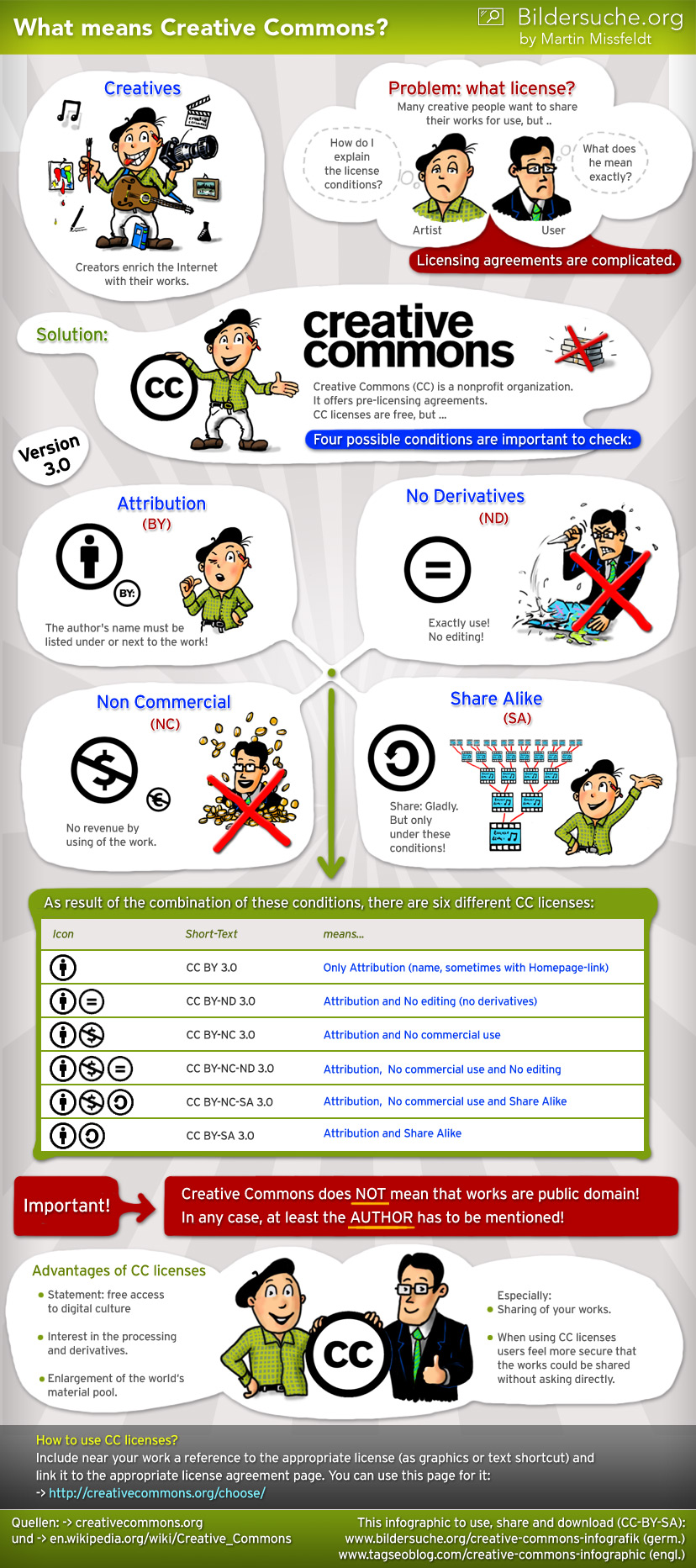
Six types of licenses are available:
CC BY, CC BY-SA, CC BY-NC, CC BY-NC-SA, CC BY-ND, and CC BY-NC-ND. These designate the level at which material
can be used without seeking permission from the copyright holder. All
include BY, indicating credit must be given to the creator. Adaptations
must be shared under the same terms and include SA. NC stands for only
non-commercial use is permitted. The designation ND indicates no
derivatives or adaptations are permitted. These licenses are
particularly relevant for content that you develop and post on the Internet.
They help you to retain copyright while sharing your work "with some rights
reserved." There is also a designation for works in the public domain
(CC0, i.e. CC Zero), which means there is no copyright nor restrictions on use. Creative Commons has an icon that you would post with your
content.
Seeking permission to use copyrighted works for multimedia projects can be
time consuming and permission might not always be granted.
Creative
Commons was developed to minimize concerns. This non-profit site was built
within current copyright law, that allows you to share your creations with
others and use media online that's been marked with a
Creative Commons license.
Six types of licenses are available:
CC BY, CC BY-SA, CC BY-NC, CC BY-NC-SA, CC BY-ND, and CC BY-NC-ND. These designate the level at which material
can be used without seeking permission from the copyright holder. All
include BY, indicating credit must be given to the creator. Adaptations
must be shared under the same terms and include SA. NC stands for only
non-commercial use is permitted. The designation ND indicates no
derivatives or adaptations are permitted. These licenses are
particularly relevant for content that you develop and post on the Internet.
They help you to retain copyright while sharing your work "with some rights
reserved." There is also a designation for works in the public domain
(CC0, i.e. CC Zero), which means there is no copyright nor restrictions on use. Creative Commons has an icon that you would post with your
content.
When users search for media using the Creative Commons Search tool, they will automatically know the terms of use by selecting a license designation. There are also filtering options to find works that you can use for commercial use or to modify or adapt. These selection designations are the key for appropriate use of media in projects for teaching and learning.
American Library Association's Copyright Advisory Network has numerous copyright resources, plus a blog where educators can post their questions about copyright issues and get replies.
American University: Center for Media & Social Impact "is an innovation incubator and research center that creates, studies, and showcases media for social impact" (About Us section). There are multiple fair use resources.
Common Sense Media: K-12 Digital Literacy & Citizenship Curriculum includes free materials for K-12 "designed to empower students to think critically, behave safely, and participate responsibly in our digital world." There are lesson plans, videos, student interactives, assessments, and materials for professional learning and parent outreach. Videos to accompany lessons can also be used alone to jumpstart discussion. Resources are aligned to Common Core standards.
Copyright Alliance "is dedicated to advocating policies that promote and preserve the value of copyright and to protecting the rights of creators and innovators" (About section). You'll find discussion of issues, resources for creators of all types of media, blogs, and more.
Copyright and Creativity contains curriculum for elementary, middle school, and high school with lessons for teaching copyright and fair use. There is also a professional development course for teachers.
Copyright from the United States Copyright Office: Learn copyright basics, read about the laws, register a work and record a document, search copyright records, and get publications, forms, and fact sheets.
Copyright and Fair Use from Stanford University
Copyright and Primary Sources from the Library of Congress also include FAQs for students on copyright and creativity.
Copyright.com from the Copyright Clearance Center: See copyright sections for academia and learn. This site contains extensive resources for copyright issues and organizations concerned with copyright. There are guidelines for creating a copyright compliance policy, registering a copyright, rights management information, and multimedia law.
Copyright Kids! is brought to you by the Copyright Society of the U.S.A. The goals of this Web site are to provide: "an educational tool to define, explain, and apply copyright issues in language understandable to Middle School students; an educational resource on copyright issues for teachers and parents of 5th - 8th graders who are engaged in a creative process; instructions about how to protect your own creations by registering them with the U.S. Copyright Office in the Library of Congress, Washington, D.C."
Copyright with Cyberbee has resources and lesson ideas for teachers on this topic. There is an HTML 5 version with an interactive question and answer activity suitable for upper elementary through high school students to learn the basics about copyright.
Crash Course in Copyright from the University of Texas: If you want to use images, videos, words, songs, designs, layouts, illustrations, diagrams, charts, and graphs or create things with them, then you should learn the copyright basics using this resource.
Creative Commons: Legally share your work with others. Four types of licenses are available to designate the level at which material can be used without seeking permission from the copyright holder: attribution, non-commercial, no derivative works, and share alike. [Note: For more information, view the Copyright and Creative Commons Video explained by Common Craft.
Digital Citizenship: Using Technology Appropriately: The site includes nine themes of digital citizenship and provides resources and publications on this theme, including a progressions chart by grade level bands for appropriately introducing elements of each theme to students.
Educator's Guide to Fair Use and Copyright is a five-part series posted at Education World.
Fair Use Guidelines for Educational Multimedia from the Congress of the United States (1996)
Fair Use Evaluator is an interactive tool from the Copyright Advisory Network of the American Library Association, Information Technology Policy. It will help you decide what is and is not fair use under the U.S. Copyright Code. You can also get a time-stamped hard or electronic copy of your fair use evaluation, using information you had provided. Also see the related Exceptions for Instructors in U.S. Copyright Code eTool to help determine if your intended use will meet conditions for using copyrighted material without the need to seek permission of the copyright holder. You can also get a pdf summary.
New Media Rights: Copyright FAQ includes a series of short YouTube videos that answer common questions on copyright and the public domain. Scripts were written by "licensed California attorneys and read by law students. This should not be considered legal advice since the facts of your specific situation can't be known" (Website disclaimer).
Podcasting Legal Guide: Rules for the Revolution is based on U.S. law, and deals with copyright and fair use in relation to the development and distribution of podcasts, and trademark issues. It includes a section relevant for librarians and teachers.
Teaching Copyright: The Electronic Frontier Foundation provides curriculum "designed to give teachers a comprehensive set of tools to educate students about copyright while incorporating activities that exercise a variety of learning skills. Lesson topics include: the history of copyright law; the relationship between copyright and innovation; fair use and its relationship to remix culture; peer-to-peer file sharing; and the interests of the stakeholders that ultimately affect how copyright is interpreted by copyright owners, consumers, courts, lawmakers, and technology innovators. The lesson plan concludes with a mock trial that tests the students' understanding of copyright and its limitations and encourages them to consider the positions of each party involved" (Overview section).
 After reviewing the copyright resources above, test your knowledge of
copyright law as it applies to educational purposes. Take the
Fair Use and Copyright Quiz
posted by California State University-Sacramento.
The 21 multiple choice questions are relevant for K-12 educators
and their learners. Students might also take
The Copyright
Challenge quiz from copyrightkids.org.
After reviewing the copyright resources above, test your knowledge of
copyright law as it applies to educational purposes. Take the
Fair Use and Copyright Quiz
posted by California State University-Sacramento.
The 21 multiple choice questions are relevant for K-12 educators
and their learners. Students might also take
The Copyright
Challenge quiz from copyrightkids.org.
Learn to write better. Resources below define plagiarism, help you prevent plagiarism, and offer plagiarism detection services.
 The Internet has made it easy for students to cut a paste content from
others into their work, particularly in their written papers. Many
students are not even aware of what constitutes plagiarism. Simply stated,
"In an instructional setting, plagiarism occurs when a writer deliberately uses
someone else’s language, ideas, or other original (not common-knowledge)
material without acknowledging its source" (Council on Writing Program
Administrators, 2019).
The Internet has made it easy for students to cut a paste content from
others into their work, particularly in their written papers. Many
students are not even aware of what constitutes plagiarism. Simply stated,
"In an instructional setting, plagiarism occurs when a writer deliberately uses
someone else’s language, ideas, or other original (not common-knowledge)
material without acknowledging its source" (Council on Writing Program
Administrators, 2019).
The best way to deter plagiarism is to prevent its occurrence in the first place by teaching students about plagiarism, copyright and fair use, and how to paraphrase. The topic should be addressed in K-12, and not just in higher education and in the workplace.
Readers might be interested in the article Plagiarism: Prevention is the Name of the Game by Patricia Deubel (2005), which appeared in English Leadership Quarterly and is available at this site.
ReadWriteThink.org also has a 3-part lesson to use with students, Exploring Plagiarism, Copyright, and Paraphrasing. The premise is that students need time to practice and must see examples of correct paraphrasing and citation methodology.
Arthur Sterngold (2004) indicated that conventional lecture-based teaching practices invite cyber-cheating. Deterring plagiarism calls for a paradigm shift toward more learner-centered teaching approaches, which incorporate "more hands-on, active, and collaborative learning methods" (p. 21). While no methods are foolproof, Sterngold provides the following strategies for preventing plagiarism in research papers:
Sterngold's strategies "allow instructors to treat most instances of plagiarism as fixable errors rather than fatal violations of academic policies" (p. 18). They are equally applicable for multimedia projects, which are developed over time and for which instructors can provide learner feedback in stages.
Unfortunately, however, the burden of proof for suspected plagiarism lies with the educator. It's time consuming and can involve manual analysis, Web searches (e.g. via Google), and use of an originality report from a plagiarism detection service, such as Turnitin. School and classroom academic integrity policies that address plagiarism and its consequences should be available to educators, students, parents, and relevant stakeholders. These can serve as a deterrance to plagiarism and should be available for all grade levels and upheld. Schools should develop them if they do not exist. Students should be aware of those policies at the beginning of a school year or course. They might be expected to sign an honor code statement indicating work submitted is their own. Patricia Deubel had first hand experience with this topic, which resulted in her 2018 publication, Punishment or policy change: A case of plagiarism in a dissertation, published in the Journal of Educational Research and Practice. The recommendations here stem from that research.
Check Plagiarism includes free and premium paid plans.
Copyleaks includes plagiarism and AI detector tools. It has three pricing plans depending on features you'd like with payments either monthly or annually. You can get each of the plagiarism detector and AI content detector tools separately or a combination of both.
Dupli Checker is a free online plagiarism checker.
Google for Education: Originality Reports
Grammarly includes a plagiarism checker. But, it offers additional features, such as the use of generative artificial intelligence to help with writing. There's a grammar checker, a citation generator, an essay-checking tool, paraphrasing tool, and more. Free and paid options are available.
Plagiarisma promotes itself as a Turnitin alternative.
Plagiarism Checker X includes free and paid versions. In the free version, you can check up to 3200 words every day. It supports multiple file types and is available in several languages. There is a free download.
Scribbr Plagiarism Checker Scribbr is in partnership with Turnitin. There is a free version. The paid premium version also includes an AI Detector and AI Proofreader.
Turnitin helps detect plagiarism, and more importantly to prevent it in the first place. For detecting plagiarism, the service relies on comparing the submitted document to documents found on the Internet, published works found in databases as ProQuest and the Gutenburg collection of literary classics, and to the millions of papers submitted to the service since 1996. Examine the research resources for students and teachers. You will find plagiarism and key research terms defined, help to identify different types of plagiarism, help with citations, and suggestions for developing good research and writing skills. Teachers will appreciate the printable handouts. Turnitin also can detect AI generated papers.
Unicheck includes a free plagiarism checker to "Search across 40B+ web sources and open access databases." For greater performance, pricing options are available for individual, K-12 and higher ed, and business clients.
Online Writing Lab (OWL) at Purdue University offers advice in how to avoid plagiarism in your work. Writing resources are extensive, including APA and MLA citation methodologies.
Plagiarism.org contains resources for preventing plagiarism and guidelines for correctly citing information. There is also a Plagiarism in the Digital Age webinar series for higher education and high schools.
Plagiarism Today was created by a victim of plagiarism who decided to fight back. Thus, the site is devoted to webmasters and copyright holders and contains resources for detecting plagiarism, content theft on the Web, learning about legal issues, copyright, contacting the plagiarist, plagiarism help, a blog for discussion, and more.
What is Plagiarism? from Georgetown University: Plagiarism is defined and issues that students commonly raise are discussed, such as paraphrasing, getting help from others, not having time to do it right, denial of plagiarism, my friends get stuff from the Internet. Information on acknowledging the work of others and examples of plagiarism are provided.
You Quote It, You Note It! is a very engaging, multimedia, interactive plagiarism tutorial brought to you by Vaughn Memorial Library at Acadia University in Canada. In about ten minutes, middle school to post secondary learners will learn how to avoid plagiarism and pick up some research tips, too.
Writing Tutorial Services at Indiana University (Bloomington): Plagiarism: What it is and how to recognize it and avoid it.
 Aiming for Integrity Quiz: How Well Do You Know Plagiarism
from Turnitin covers the different types of plagiarism.
Aiming for Integrity Quiz: How Well Do You Know Plagiarism
from Turnitin covers the different types of plagiarism.
The How to Recognize Plagiarism: Tutorials and Tests from the College of Education at Indiana University Bloomington checks to see if you can recognize plagiarism in writing.
Back to top | Part 4: Multimedia in Projects: Page 1 | 2 | 3
Center for Media and Social Impact. (2008, November). The code of best practices in fair use for media literacy education. https://cmsimpact.org/code/code-best-practices-fair-use-media-literacy-education/
Chiles, L., Riddle, N., & Rich, L. (2003, October). Are you breaking the law? Copyright guidelines for video streaming and digital video in the classroom. THE Journal, 31(3), 36-39. https://thejournal.com/articles/2003/10/01/are-you-breaking-the-law.aspx
Council on Writing Program Administrators (2019). Defining and avoiding plagiarism: The WPA statement on best practices. https://www.wpacouncil.org/aws/CWPA/pt/sd/news_article/272555/_PARENT/layout_details/false
Deubel, P. (2005). Plagiarism: Prevention is the name of the game. English Leadership Quarterly, 28(1), 6-11. [Also available at this site. Click on the title.]
Deubel, P. (2018). Punishment or policy change: A case of plagiarism in a dissertation. Journal of Educational Research and Practice, 8(1), 101-112. https://doi.org/10.5590/JERAP.2018.08.1.08
Fair Use Guidelines for Educational Multimedia. (1996). https://my.cgu.edu/it/wp-content/uploads/sites/5/2020/07/MMFUGuides.pdf
Sterngold, A. (2004, May/June). Confronting plagiarism: How conventional teaching invites cyber-cheating. Change, 36(3), 16-21.
 See
other Technology Integration pages:
See
other Technology Integration pages:
Part 4: Multimedia in Projects: Page 1 | 2 | 3
Part 1: Essential Questions | Part 2: Technology Integration Resources | Part 3: Web Page Design
 Comments?
Are you finding resources at CT4ME of value?
Comments?
Are you finding resources at CT4ME of value?
Contact Dr. Patricia Deubel: pdeubel@ct4me.net
To cite this page, use the following format:
Deubel, P. (year from last revised). Technology integration: Multimedia in projects: Copyright, fair use, plagiarism. Computing Technology for Math Excellence. Retrieved Month, Day, Year, from https://www.ct4me.net/multimedia_in_projects_3.htm
CT4ME Author: Dr. Patricia Deubel
Copyright © 2001-2024 [CT4ME.net]. All rights reserved.